All TV Service Menu Code

Electronic Repair, Manuals, Reference and TV Factory service mode

  • Home
  • Database
  • LCD
  • LED
  • CRT
  • Plasma
  • DLP
  • FORUM
  • Upload
  • Download
  • Join
  • Rss
  • Mobile
  • Panasonic TC-42P1 TV Service menu
  • Grundig TV Hotel mode
  • Grundig Chassis 22.1 TV Service menu
  • Grundig Chassis D6 TV Service menu
  • Hipson TV Service Menu
  • Panasonic TX-15LT2Z TV Service menu
  • Panasonic TAU TV Service Menu
  • Panasonic CT-Z1422 TV Service Menu
  • Hamilton
  • Hitachi TV Service Menu

AKAI 2120-TUK TV Service Menu

Akai | Author | December 17, 2020

 How to enter AKAI TV 2120 TV Service Menu chassis MP2


Open AKAI 2120-TUK TV Service Menu mode


Описание относится ко всему семейству телевизоров, указанных в таблице, построенных на базе шасси MONO PLUS 2.

Необходимость выполнять сервисные настройки возникает каждый раз при замене энергонезависимой памяти.
Все настройки производятся с помощью штатного передатчика дистанционного управления, расположенного на
получатель,
Все настройки отображаются на экране в виде сообщений OSD.

Способ входа в сервисный режим

Спроецируйте три команды в указанном на пульте дистанционного управления порядке:

[MUTE] ==> [OK] ([M]) ==> [TV].

Подтверждением входа в сервисный режим является отображение на экране первого из сервисных подменю (Сервисное меню
ню 1).


Сервис reaulatu

Переключение между отдельными подменю (1, 2 и 3) в сервисном режиме осуществляется последовательно с помощью
нажатием [Синей] кнопки.

Конкретный параметр выбирается из отображаемого меню с помощью кнопок курсора].
Изменение значений параметров возможно с помощью кнопок [4], [►].
Сохраненные параметры сохраняются с помощью кнопки [OK] ([M]).
В таблицах ниже представлены параметры, установленные в определенных сервисных меню.

 
Сервисное меню ТВ AKAI TV1420 1

Запустить APS

option .YES »- означает, что будет запущен автоматический поиск радиостанции.
после первого включения ресивера и все найденные программы будут автоматически
автоматически сохраняется в памяти приемника,
установка опции «НЕТ» отключает автоматическое программирование приемника после
включить


V- Амплитуда

Контроль высоты изображения


H-Shift

Отрегулируйте мощность изображения по горизонтали


U1

регулировка сетевого напряжения (устанавливается в соответствии с процедурой, описанной в пункте «регулировка на
пять строк ")

AGC

автоматическая регулировка усиления (устанавливается в соответствии с процедурой, описанной в пункте
«Автоматическая регулировка усиления»)

 
Сервисное меню ТВ AKAI TV1420 2

Установить стандарт @ выберите стандарт ТВ

APS Standard @ стандартная настройка для функции автоматического программирования приемника (APS)

RC Mode @ wvbór tvpu nadainika remotei Adjust

Front AV @ выставить опцию «ДА» - если есть внешний источник сигнала

Текстовые символы @wvbor Генератор символов телетекста: OFF, EU + CS, EU + TR, Eastl, East2


Сервисное меню ТВ AKAI TV1420 3

Эквалайзер @ опция «ДА» - означает включение функции регулировки характеристики

C4 бит @bit информирующий о типе передачи звука (аналоговый, NICAM),
опция «ДА» - означает, что телефон аналоговый

Громкость @ включение / выключение дополнительных звуковых эффектов

AVC @opcia "YES" - активирует функцию шумоподавления.

Параметр Carrier Mute @ "YES" отключает звуковой сигнал при отсутствии несущей.

Hi - Dev @ отображает строку HDM в аудио меню, функция, используемая в случае чрезмерной модуляции аудиосигнала.


Примерные процедуры настройки параметров в сервисном режиме

Примечание: перед выполнением любых настроек в сервисном режиме это правильно.
установка значения сетевого напряжения.
Сервисное меню телевизора AKAI TV1420 Регулировка линейного напряжения (U1)
• установить минимальную контрастность и яркость изображения,
• подключите контрольную точку XF01 (опорная плита) к земле,
• подключить вольтметр постоянного тока к точке измерения XO03,
• войти в сервисный режим (меню 1),
• с помощью кнопок [- * •], [▼] выбрать параметр «U1» в сервисном меню 1,
• с помощью кнопок курсора [<], [►] установите правильное значение сетевого напряжения в зависимости от типа
кинескопа:
- 110 В ± 1 В для 14-дюймовых ЭЛТ (Philips / Samtel),
135 В ± 1 В для 21-дюймовых ЭЛТ (Philips),
- 150 В ± 1 В для кинескопов 25 и 28 дюймов (Videocolor),
• нажмите кнопку [OK] ([M]), чтобы сохранить заданные значения,
• снимите перемычку с точки XF01,
• выйти из сервисного режима командой [TV].

AKAI TV1420 TV Автоматическая регулировка усиления (АРУ)
подключите контрольную точку XF01 (основная плата) к земле,
на антенный вход сигнал без наводки на уровне 72 дБ ^ мкВ на одном из средних каналов
Диапазоны УВЧ,
войти в сервисный режим (меню 1),
с помощью кнопок курсора [- * -], [▼] выбрать параметр AGC в сервисном меню 1,
подключите осциллограф к выходу тюнера (XL03 или XL04) (диапазон> 50 МГц),
Используйте кнопки курсора [<], [►], чтобы установить напряжение 350 мВпик относительно синхроимпульсов. Толе-
напряжение установленного напряжения не должно превышать ± 50 мВ,
нажмите кнопку [OK] ([M]), чтобы сохранить установленное значение,
снимите перемычку с контрольной точки XF01,
выйти из сервисного режима командой [TV].


AKAI 2120-TUK TV Service Menu


AKAI 2021-T Euro TV Service Menu

Akai | Author | December 16, 2020

How to enter AKAI TV model 2021-T Euro TV Service Menu


AKAI 2021-T Euro TV Service Menu

AKAI 2021-T Euro TV Service Menu


The method of entering the service mode

Use your original Akai 2021 Remote control to enter Akai TV factory menu mode

Press MUTE ==> OK ([M]) ==> TV.

To save new settings please enter power button.


Open AKAI 2021-T Euro TV Service Menu mode


AKAI TV 2020 UK TV Service Menu

Akai | Author | December 14, 2020

 How to enter AKAI TV 2020 UK service menu mode


AKAI TV 2020 UK TV Service Menu

AKAI TV 2020 UK TV Service Menu

Open akai TV 2020 UK Service menu mode


AKAI TV1420 TV Service Menu

Akai | Author | December 13, 2020

These service menu mode can use for AKAI, FINLUX, LUXOR, NOKIA, SALORA - chassis MONO PLUS 2

AKAI TV 1420-Euro
AKAI TV 1420-T Euro
AKAI TV 1421
AKAI TV 1421-T
AKAI TV 1421-T Euro
AKAI TV 2020 UK
AKAI TV 2020-T UK
AKAI TV 2020-Euro
AKAI TV 2021
AKAI TV 2021-T
AKAI TV 2021-T Euro
AKAI TV 2120-TUK
AKAI TV 2120 Euro
AKAI TV 2120 T Euro
AKAI TV 2121
AKAI TV 2121-T
AKAI TV 2121-T Euro 

NOKIA 3721
NOKIA 3721-TEuro
NOKIA 5121
NOKIA 5121-T
NOKIA 5121-T Euro
NOKIA 5521
NOKIA 5521-T
NOKIA 5521VT Euro

FINLUX MAI TX
FINLUX 51A1TX
FINLUX 55A1TX

LUXOR 3392 TX
LUXOR 5192 TX
LUXOR 5592 TX

SALORA 14MP50 VTT 1C0
SALORA 20MP50 VT7 1CO
SALORA 21MP50 VTT 1CO

The equipment use microcontroler IC SDA5222. SDA5223, SDA5252 and SDA 5253


Opis dotyczy calej rodziny odbiorników telewizyjnych wyszczególnionych w tablicy, zbudowanych w oparciu o chassis MONO PLUS 2

Koniecznosc dokonywania regulacji serwisowych zachodzi przy kazdorazowej wymianie pamiçci nieulotnej.
Wszystkie regulacje dokonywane    przy uzyciu standardowego nadajnika zdalnej regulacji, znajdu&cego sic na wypo-
sazeniu odbiornika,
Wszystkie nastawy sygnalizowane s^na ekranie w formie komunikatów OSD.

Sposób wejscia w tryb serwisowy

Wystec z nadajnika zdalnej regulacji trzy rozkazy w podanej polejnosci:

[ MUTE ] ==> [ OK] ([M]) ==> [ TV ].

Potwierdzeniem wejscia w tryb serwisowy jest wyswietlenie na ekranie pierwszego z submenu serwisowego (Service me-
nu 1).


Reaulacie serwisowe

Przefqczanie pomiçdzy poszczególnymi submenu (1, 2 i 3) w trybie serwisowym dokonuje sie w sposób sekwencyjny za
pomoca przycisku [ Niebieskiego ].

Wyboru okreslonego parametru z wyèwietlanego menu dokonuje sic za pomocq przycisków kursora ].
Zmiany wartosci parametrów umozliwiaja przyciski kursora [ 4 ], [ ► ].
Zapamiçtanie ustawionych parametrów realizowane jest za pomoc^ przycisku [ OK ] ([ M ]).
Ponizsze tablice przedstawiaja parametry ustawiane w poszczególnych menu serwisowych. 


AKAI TV1420 TV Service Menu 1

Start APS

opcja .YES" - oznacza, ze funkcja automatycznego wyszukiwania stacji zostanie urucho-
miona po pierwszym wlqczeniu odbiornika i wszystkie napotkane programy zostana au-
tomatycznie zapamiçtane w pamiçci odbiornika,
ustawienie opcji „NO" blokuje procedure automatycznego programowania odbiornika po
wtaczeniu zasilania 


V- Amplitude

regulada wysokosci obrazu


H-Shift 

Regulada potozenia obrazu w poziomie


U1

regulacja napiçcia linii (ustawiac zgodnie z procedure opisana w punkcie "regulacja na-
piecia linii") 

AGC

automatyczna regulacja wzmocnienia (ustawiac zgodnie z procedure opisana w punkcie
"Automatvczna requlacia wzmocnienia")


AKAI TV1420 TV Service Menu 2

Set Standard   @wybór standardu tefewizyjnego

APS Standard @ustawianie standardu dla funkcii automatycznego programowania odbiornika (APS)

RC Mode  @wvbór tvpu nadainika zdalnei regulacji

Front AV @ustawic opcje „YES" - jesli jest dostepne zewnetrzne zródto sygnatu 

Text Characters  @wvbor aeneratora znakow teletekstowvch: OFF, EU + CS, EU + TR, Eastl, East2


AKAI TV1420 TV Service Menu 3

Equalizer @opcja „YES" - oznacza uaktywnienie funkcji ksztattowania charakterystyki

C4 bit @bit informuj^cy o rodzaju transmisji dzwiçku (analogowy, NICAM),
opcja „YES" - oznacza przetaczenie na fonie analogowa

Loudness @wi^czanie / wyiqczanie dodatkowych efektow fonicznych

AVC @opcia „YES" - uaktywnia funkcie tlumienia zaktóceñ

Carrier Mute   @opcja „YES" wycisza sygnat fonii przy braku nosnej

Hi - Dev @wyswietla w menu audio liniç HDM, funkcja uzywana w przypadku przemodulowania sygnatu fonii


Przyktadowe procedury ustawiania parametrów w trybie serwisowym

Uwapa: Przed przystqpieniem do wykonywania jakichkolwiek regulacji w trybie serwisowym zaiecane jest poprawne
ustawienie wartoäci napiecia linii.
AKAI TV1420 TV Service Menu Regulacja napi$cia linii (U1)
• ustawic kontrast oraz jaskrawosc obrazu na minimum,
• potqczyc punkt testowy XF01 (pfyta bazowa) do masy,
• do punktu pomiarowego XO03 do^czyc woltomierz napi^cia stalego,
• wej^c do trybu serwisowego (menu 1),
• za pomocq przycisköw kursora [-*•], [▼] wybrac parametr „U1" w menu serwisowym 1,
• za pomocq, przycisköw kursora [<],[►] ustawic poprawn^ warto§6 napi§cia linii w zaleznoäci od typu zastosowane-
go kineskopu:
- 110V ± 1V dla kineskopöw 14-calowych (Philips/Samtel),
- 135V ± 1V dla kineskopöw 21-calowych (Philips),
- 150V ± 1V dla kineskopöw 25- i 28-calowych (Videocolor),
• nacisnaö przycisk [ OK ] ([ M ]) w celu zapami^tania ustawionych wartosci,
• usunqc zwor§ z punktu XF01,
• wyjsö z trybu serwisowego za pomocq rozkazu [TV].

AKAI TV1420 TV Automatyczna regulacja wzmocnienia (AGC)
polqczyc punkt testowy XF01 (plyta bazowa) do masy,
do wejécia antenowego dotaczyó sygnal bez podnoánej fonii o poziomie 72 dB^iV na jednym ze érodkowych kanatów
pasma UHF,
wejsc do trybu serwisowego (menu 1),
za pomoca przycisköw kursora [ -*-],[▼] wybrac parametr AGC w menu serwisowym 1,
do wyjácia tunera (XL03 lub XL04) dolqczyó oscyloskop (pasmo > 50 MHz),
za pomocci przycisköw kursora [< ], [ ► ] ustawic napiecie 350 mVpp w odniesieniu do impulsów synchronizacji. Tole-
rancia ustawianego napi^cia nie powinna przekroczyc ±50 mV,
nacisnac przycisk [ OK ] ([ M ]) w celu zapami^tania ustawionej wartosci,
usunqé zwor§ z punktu testowego XF01,
wyjsc z trybu serwisowego za pomoca rozkazu [ TV ].


AKAI TV1420 TV Service Menu

AKAI TV1420 TV Service Menu


ENGLISH

AKAI        TV1420, TV1421, TV2020, TV2021, TV2120 & TV2121
FINLUX    14A1 TX, 51A1 TX & 55A1 TX
LUXOR     3392 TX, 5192 TX & 5592 TX
NOKIA      3721, 5121, 5521
SALORA   14MP50 VT, 20MP50 VT & 21MP50 VT

The description applies to the entire family of TV sets listed in the table, built on the basis of the MONO PLUS 2 chassis

The need to make service adjustments occurs each time the non-volatile memory is replaced.
All adjustments are made using the standard remote control transmitter, located on the
the receiver,
All settings are signaled on the screen in the form of OSD messages.

The method of entering the service mode

Project the three commands in the order shown from the remote control:

[MUTE] ==> [OK] ([M]) ==> [TV].

Confirmation of entering the service mode is displaying on the screen the first of the service submenu (Service menu
nu 1).


Service menu mode

Switching between the individual submenus (1, 2 and 3) in the service mode is done sequentially with
by pressing the [Blue] button.

The selection of a specific parameter from the displayed menu is performed using the cursor buttons].
Changing the parameter values ​​is possible with the [4], [►] buttons.
The saved parameters are saved by pressing the [OK] ([M]) button.
The tables below present parameters set in particular service menus.


AKAI TV1420 TV Service Menu 1

Start APS

option .YES "- means that the automatic station search function will be started
after the receiver is turned on for the first time and all the programs found will be automatically
automatically stored in the receiver's memory,
setting the option "NO" disables the automatic programming of the receiver after
power on


V- Amplitude

Image height control


H-Shift

Adjust the horizontal image power


U1

line voltage regulation (set in accordance with the procedure described in the point "regulation on
five lines ")

AGC

automatic gain control (set in accordance with the procedure described in point
"Automatic requlacia amplification")

 
AKAI TV1420 TV Service Menu 2

Set Standard @ select the TV standard

APS Standard @ standard setting for the automatic programming function of the receiver (APS)

RC Mode @ wvbór tvpu nadainika remotei adjustment

Front AV @ set the option "YES" - if there is an external signal source

Text Characters @wvbor teletext characters generator: OFF, EU + CS, EU + TR, Eastl, East2


AKAI TV1420 TV Service Menu 3

Equalizer @ "YES" option - means activating the characteristic development function

C4 bit @bit informing about the type of sound transmission (analog, NICAM),
option "YES" - means that the phone is analogue

Loudness @ turn on / off additional sound effects

AVC @opcia "YES" - activates the noise suppression function

Carrier Mute @ "YES" option mutes the audio signal in the absence of carrier

Hi - Dev @ displays the HDM line in the audio menu, a function used in case of over-modulation of the audio signal


Exemplary parameter setting procedures in the service mode

Note: Before any adjustments are made in the service mode, it is correct
setting the line voltage value.


AKAI TV1420 TV Service Menu Line voltage adjustment (U1)
• set the contrast and brightness of the image to the minimum,
• connect the test point XF01 (base plate) to ground,
• connect a DC voltmeter to the XO03 measurement point,
• enter the service mode (menu 1),
• use the [- * •], [▼] buttons to select the "U1" parameter in the service menu 1,
• use the cursor buttons [<], [►] to set the correct value of the line voltage, depending on the type of
of the picture tube:
- 110V ± 1V for 14-inch CRTs (Philips / Samtel),
- 135V ± 1V for 21 inch CRTs (Philips),
- 150V ± 1V for 25- and 28-inch picture tubes (Videocolor),
• press the [OK] ([M]) button to save the set values,
• remove the jumper from point XF01,
• quit the service mode with the [TV] command.

AKAI TV1420 TV Automatic Gain Control (AGC)
connect test point XF01 (base board) to ground,
to the antenna input a signal without pick-up at the level of 72 dB ^ iV on one of the middle channels
UHF bands,
enter the service mode (menu 1),
use the [- * -], [▼] cursor buttons to select the AGC parameter in the service menu 1,
connect an oscilloscope to the tuner output (XL03 or XL04) (band> 50 MHz),
use the [<], [►] cursor buttons to set the voltage of 350 mVpp with reference to the sync pulses. Tole-
the voltage should not exceed ± 50 mV,
by pressing the [OK] ([M]) button to save the value set,
remove the jumper from test point XF01,
quit the service mode with the [TV] command.


Schneider STV2801T TV Service Menu

Akai | Author | December 09, 2020

SCHNEIDER STV 2801 T service mode can use for AKAI TV 2835

AKAI, SCHNEIDER Television - chassis TV9.7 / TV9.8

POLISH

Koniecznosc ustawiania trybu serwisowego zachodzi w przypadku wymiany parried nieulotnej, kineskopu lub elemen-
towtoru odchylania linii i ramki.
Wszystkie nastawy zwi^zane z trybem serwisowym dokonywane sq przy u^yciu standardowego nadajnika zdalnego ste-
rowania, znajduj^cego si? na wyposazeniu odbiornika.
Ustawiane parametry sygnalizowane    na ekranie wformie komunikat6w OSD.
Przed wejsciem w tryb serwisowy nalezy do wejscia antenowego odbiornika doprowadzic sygnal testowy.


ENGLISH

It is necessary to set the service mode in the case of replacement of the non-volatile parried, kinescope or element
line and frame deflection track.
All settings related to the service mode are made using a standard remote control
rowania, located? on the receiver accessories.
The set parameters are signaled on the screen in the form of OSD messages.
Before entering the service mode, apply a test signal to the receiver's antenna input.


POLISH

Sposob wejscia w tryb serwisowy

Uwapa: Przed wejsciem w tryb serwisowy nalezy do wejscia antenowego doprowadzic sygnaf testowy, regulator jaskra-
wosci, nasycenia koloru i kontrastu ustawic wsrodkowym potozeniu.
Wykonac w podanej kolejnosci nast^puj^ce czynnosci:
• wcisnqc, a nast^pnie zwolni6 przycisk [ Mute ] w nadajniku zdalnej regulacji,
• nastepnie wyslac w podanej kolejnosci dwa rozkazy z nadajnika zdalnej regulacji:

[OK] ==> [TV]

Potwierdzeniem wprowadzenia odbiornika w tryb serwisowy jest w>6wietlenie na ekranie odpowiedniego menu serwisowego.


English

How to enter the service mode

Note: Before entering the service mode, a test signal must be applied to the antenna input, the glare control
set the value, color saturation and contrast to the midpoint.
Carry out the following steps in the order given:
• press and then release the [Mute] button on the remote control transmitter,
• then send in the given sequence two commands from the remote control transmitter:

[OK] ==> [TV]

The appropriate service menu is displayed on the screen to confirm that the receiver has entered the service mode.


POLISH

Regulacje serwisowe

Do obsfugi menu serwisowego wykorzystywane sa nastepujace przyciski w nadajniku zdalnej regulacji:

przycisk [ VISION ] (zotty) umozliwia wybor submenu,
przyciski [ P+ ] oraz [ P- ] sluzqdo wyboru regulowanego parametru,
przyciski [ Vol+ ] oraz [ Vol- ] umoaiwiaj^zmian? wartosci wybranego parametru,
przycisk [ OK 1 (czerwony) umozliwia zapamietanie ustawionei wartoSci parametru.

W tablicy 1 wyszczegdlnione zostaty parametry mctfliwe do ustawienia w trybie serwisowym. Wywofanie ich odbywa sie za pomoca zoltego przycisku [ VISION ]. Kazda zmiane nalezy oddzielnie zapamietac za pomoca czerwonego przycisku [ OK ]. 


Schneider STV2801T TV Service Menu


AKAI CT-W3257 TV Service Menu

Akai | Author | July 06, 2020

This service menu code also for AKAI CT-W2855
The description applies to the entire family of television sets equipped with a digital signature processing block (so-called feature Bo / 1).
It is necessary to set the service mode each time the non-volatile memory is changed, the picture tube
or elements in the line and frame deflection path.
All adjustments made using the standard remote control transmitter on the receiver.
Set parameters are signaled on the screen in the form of OSD messages.

A way to enter the service mode AKAI CT-W3257 TV Service Menu
Turn the receiver ON with the power switch and send from the remote control transmitter in no less than 5 seconds from the moment of switching on, three orders in the given order:
[MENU] - »[TV] -> [i]
Note: If after performing these actions the receiver stays in the standby state, please turn it on and through double command [TV] and put into service mode with command [i].
Confirmation of entering the receiver into the service mode is the appearance on the screen of the corresponding adjustment menu.

The presented menu contains the name and code of the parameter being adjusted, as well as two values, on the left the value entered while initializing the memory, while the right shows the current value of the adjustable size.
Note: If you need to switch to TV mode temporarily (e.g. change program), you must perform
[TV] order. The return to the service mode follows after the command [i].

Memory initialization
When replacing the non-volatile memory, it is recommended to carry out the settings in the service mode before proceeding.
performing so-called memory initialization. The purpose of this process is to enter the appropriate settings to enable you to enter between them brightening the screen, or entering approximate values ​​that determine the geometrical dimensions of the image.
In order to initialize the memory, you should:
• put the receiver into service mode in accordance with section 1 (the receiver will be in the service mode even though looks similar to the standby mode),
• by pressing the [Red] button, the green LED should blink to indicate that the initialization process has started.
During this time, the controlling microcontroller checks the content of the EEPROM memory, which has an impact on the course of the whole process:
a) if the memory is "non-volatile", initialization occurs automatically. The process lasts about 15 seconds kund, followed by the green LED lighting up, which indicates that the process has been completed.
b) if the process of automatic initialization has not taken place (the green LED lights immediately after the start of the process, or does not light up at all) it is possible that the data saved in the memory are correct and just save the existing configuration? with the help of the [OK] command.
c) if the automatic initialization process does not take place and the existing data in the memory are not. correct, there is a possibility 6 perform initialization manually. To do this, press the [Blue] button, wait for about 2 seconds, press in turn the [2], [5] and [4] buttons, with 2-second time intervals and save sac configuration by command [OK].
Switch off the receiver with the power switch, put the receiver back into the service mode (item 1), if the receiver remains in the standby state by pressing two the [TV] button and then [i], check the configuration of the receiver using the [Red] command (the screen should display figurative described in point 3), save the configuration with [OK] command, switch to TV mode with the [TV] command and preset the stations, order [and] to return to the service mode, carry out necessary service adjustments (item 4), turn off the receiver with the power switch.

System configuration control and option selection
The process of configuring the receiver should be carried out each time you add or change a specific option. After pressing the [Red] button in the service mode, the controlling microcontroller checks all possible addresses systems connected to the l2C bus, and then the existing configuration will be displayed on the receiver screen.
This procedure also allows you to check that each of your existing integrated circuits is in the configuration process found. If the specified option is not set to J "even though the system is installed, it means its defective device. For testing purposes it is also possible to disable specific options (set to "0"). Sample table containing both system configurations and option bytes is shown below:


AKAI CT-W3257 factory mode

AKAI CT-W3257 TV Service Menu


The first four bytes (MC DEV ...) relate to the configuration of the receiver, the next five (OPT ...) affect setting options. Information related to the control program version is displayed at the bottom of the table.
■ Any byte is selected? with the cursor buttons [[▼]. The currently selected byte remains
swietlony.
■ Change of individual bits is made by using% numeric commands [0..7].
■ Saving the set configuration is done with the help of the [OK] command.
■ Pressing the [Red] button again will exit the configuration table and return to the service mode.
The following tables show the purpose of the bits in individual bytes.

Service regulations AKAI CT-W3257 TV Service Menu
Note: Before attempting to perform service adjustments, it is recommended to set the correct value for fifth line and second grid tension. To set the line voltage:
• set the trim and contrast regulators to normal,
• connect a voltmeter to the cathode of the Do11 diode,
• set the voltage of the line voltage to 155V ± 1V with the Po1 potentiometer.
To set the correct value of the second grid voltage, follow these steps:
• set the brightness and saturation color regulators in normal pohtenie,
• set the contrast regulator to the minimum,
• using the oscilloscope to find the cathode with the highest level of measuring pulses (carry out observation on n.9, n.12 and n.15 ICh1),
• set the second grid potentiometer to 140V.
Service adjustments are made using the number buttons and the cursor buttons. In addition, a button
[Gold] turns off for a moment? service menu displayed on the screen. To adjust the selected parameter belongs:
• enter the two-digit number (code) from the given register using the number buttons, eg to adjust the
image sharpness - 00 (you can also select the parameter to be adjusted using the cursor buttons [M).
• set the desired value using the cursor buttons [<], [►] ■
• remember each of the set values ​​in the non-volatile memory by pressing the [OK] button.

Note: For receivers equipped with panoramic CRTs (16: 9), initially regulations for 4: 3 format. Then, for the 16: 9 format, only settings related to the geometric image should be restored.
The tables summarize the purpose of individual registers. The next columns will show two the standard register code, its purpose, method of displaying it on the screen (OSD), value entered at initialization memory (Init) and any comments about how to make the adjustment.

AKAI CT-W3257 TV Service Menu in POLISH
Opis dotyczy catej rodziny odbiornikow telewizyjnych wyposazonych w blok cyfrowej obrobki sygnatow (tzw. feature Bo/1).
Koniecznosc ustawiania trybu serwisowego zachodzi kazdorazowo w przypadku wymiany pami^ci nieulotnej, kineskopu
lub elementow w torze odchylania linii i ramki.
Wszystkie regulacje dokonywane przy u2yciu standardowego nadajnika zdalnej regulacji znajdujqcego si§ na wypo-
sazeniu odbiornika.
Ustawiane parametry sygnalizowane    na ekranie wformie komunikatow OSD.

Sposob wejscia w tryb serwisowy
WJ^czyC odbiornik wyt^cznikiem sieciowym i wysla6 z nadajnika zdalnej regulacji w czasie nie dtuzszym nit 5 sekund od
momentu wtqczenia, trzy rozkazy w podanej kolejnosci:
[ MENU ] -»[ TV ] -> [ i ]
Uwaga: JeSIi po wykonaniu tych czynnosci odbiornik pozostanie w stanie standby nalezy go sprdbowac wtqczyc poprzez
dwukrotne wysfanie rozkazu[ TV] i wprowadzic w tryb serwisowy za pomocq rozkazu[i].
Potwierdzeniem wprowadzenia odbiornika w tryb serwisowy jest pojawienie si§ na ekranie odpowiedniego menu regulacyjnego.

Przedstawione menu zawiera nazw§ i kod regulowanego parametru oraz dwie wartoSci, z lewej strony wartosc wpisan^ w
procesie inicjalizacji pami^ci, natomiast z prawej aktualnq wartosc regulowanej wielko^ci.
Uwaaa: Jesli zachodzi koniecznosc chwifowego przejscia do trybu telewizyjnego (np. zmiana programu), nalezy wystac
rozkaz [ TV]. Powrot do trybu serwisowego nast?puje po wystaniu rozkazu[ i].

Inicializacja pamieci
W przypadku wymiany pami^ci nieulotnej przed przyst^pieniem do wykonywania nastaw w trybie serwisowym zaleca si?
wykonanie tak zwanej inicjalizacji pami^ci. Proces ten ma na celu wpisanie odpowiednich nastaw umozliwiajeicych mi§dzy
innymi rozjaSnienie ekranu, czy wprowadzenie przyblizonych wartosci okreslajqcych wymiary geometryczne obrazu.
W celu przeprowadzenia procesu inicjalizacji pami^ci nalezy:
• wprowadzic odbiornik w tryb pracy serwisowej zgodnie z pkt. 1 (odbiornik b$dzie w trybie serwisowym pomimo, ±e
wyglqda podobnie jak w stanie standby),
• wcisnqc przycisk [ Czerwony ], zielona dioda LED powinna mrugnqc informuj^c o rozpocz^ciu procesu inicjalizacji.
W tym czasie mikrokontroler steruj^cy sprawdza zawartosc pami^ci EEPROM, kt6ra ma wptyw na przebieg calego
procesu:
a) jeSli pami^e nieulotna jest „czysta" inicjalizacja nast?puje w sposob automatyczny. Proces ten trwa okoto 15 se-
kund, po czym nast^puje zapalenie zielonej diody LED, ktdra informuje o zakonczeniu procesu.
b) jesli proces automatycznej inicjalizacji nie nastqpil (zielona dioda swieci natychmiast po rozpocz^ciu procesu, lub
nie zapala si§ wcale) mo±liwe jest, ze dane zapisane w pami^ci sq, poprawne i wystarczy zapisac istniejqc^ konfi-
guracj? za pomoc^ rozkazu [ OK ].
c) jesli proces automatycznej inicjalizacji nie nast^pii a istniejqce w pami^ci dane nie sq. poprawne, istnieje mozliwos6
przeprowadzenia inicjalizacji w sposob r^czny. W tym celu nalezy wcisnqc przycisk [ Niebieski ], odczekac okolo 2
sekund, wcisnqc kolejno przyciski [ 2 ], [ 5 ] oraz [ 4 ], przy zachowaniu 2 sekundowych przerw czasowych i zapi-
sac konfiguracj§ rozkazem [ OK ].
wyJqczyd odbiornik wyiqcznikiem sieciowym,
wprowadzic odbiornik ponownie w tryb serwisowy (pkt. 1), jesli odbiornik pozostaje w stanie standby wcisn^c dwu-
krotnie przycisk [ TV ] a nast^pnie [ i ],
sprawdzic konfiguracj§ odbiornika za pomoc^ rozkazu [ Czerwonego], (na ekranie powinno si§ wyswietlic menu kon-
figuracyjne opisane w punkcie 3),
zapami^tac konfiguracje rozkazem [ OK ],
przej§6 rozkazem [ TV ] do trybu telewizyjnego i zaprogramowac stacje,
rozkazem [ i ] powrocic do trybu serwisowego,
przeprowadzid niezb^dne regulacje serwisowe (pkt. 4),
wylqczyc odbiornik wylqcznikiem sieciowym.

Kontrola konfiguracji uktadowej i wybor opcji
Proces konfigurowania odbiornika nalezy przeprowadzac po kazdorazowym dolozeniu lub zmianie okreslonej opcji. Po
wcisni^ciu w trybie serwisowym przycisku [Czerwonego] mikrokontroler sterujqcy sprawdza wszystkie mo£liwe adresy
ukladow dof^czonych do szyny l2C, a nast^pnie istniej^cq konfiguracj^ wyswietli na ekranie odbiornika.
Procedura ta umozliwia takze sprawdzenie, czy kazdy z istniej^cych uktedow scalonych zostaje w procesie konfiguracji
znaleziony. Jesli okreslona opcja nie jest ustawiona na J" pomimo, ze uktad jest zainstalowany, oznacza to jego uszko-
dzenie. Dla celow testowych mozliwe jest takze wyl^czenie okreslonych opcji (ustawienie na „0"). Przykladowa tablica
zawieraj^ca zarowno konfiguracji ukladow^jak i bajty opcji zostala przedstawiona ponizej:

Pierwsze cztery bajty (MC DEV ...) dotycz^ konfiguracji ukfadowej odbiornika, nast^pne pi^c (OPT ...) majq wptyw na
ustawienie opcji. Na dole tablicy wyswietlane    informacje zwi^zane z wersjq programu sterujqcego.
■ Wyboru dowolnego bajtu dokonuje si? za pomoc^ przyciskow kursora [      [▼]. Aktualnie wybrany bajt zostaje pod-
swietlony.
■ Zmiana poszczegblnych bitow dokonywana jest za pomoc% rozkazow numerycznych [ 0..7 ].
■ Zapami?tanie ustawionej konfiguracji odbywa si? za pomoc^ rozkazu [ OK ].
■ Ponownie wcisni^cie przycisku [ Czerwonego ] spowoduje wyjscie z tablicy konfiguracyjnej i powrot do trybu serwisowego.
W kolejnych tablicach przedstawione zostalo przeznaczenie bitow w poszczegdlnych bajtach.

Regulacje serwisowe
Uwaaa: Przed przystqpieniem do wykonywania regulacji serwisowych zalecane jest ustawienie poprawnej warioSci na-
pi$cia linii i napiqcia siatki drugiej. W celu ustawienia napiqcia linii nalezy:
• regulatoryjaskrawosci i kontrastu ustawic w normalnym potozeniu,
• dofqczyc woltomierz do katody diody Do11,
• potencjometrem Po1 ustawid wartoic napiqcia linii na 155V±1V.
Aby ustawid poprawnq wartosc napiqcia siatki drugiej nalezy wykonad nastqpujqce czynnosci:
• regulatory jaskrawosci i nasycenia kolorow ustawic w normalnym pohteniu,
• regulator kontrastu ustawid na minimum,
• za pomocq oscyloskopu znalezc katodq z najwyzszym poziomem impulsow pomiarowych (obserwacjq przeprowadzac
na n.9, n.12 i n.15 ICh1),
• potencjometrem siatki drugiej ustawic poziom impulsow na 140V.
Regulacje serwisowe dokonywane przy uzyciu przyciskow numerowych oraz przyciskow kursora. Dodatkowo przycisk
[Zotty ] wylqcza na chwil? wyswietlane na ekranie menu serwisowe. W celu dokonania regulacji wybranego parametru
nalezy:
• wprowadzic dwucyfrowy numer (kod) z^danego rejestru przy uiyciu przyciskow numerowych, np. w celu regulacji wy-
sokosci obrazu - 00 (wyboru regulowanego parametru mozna dokonac takze za pomocq przyciskow kursora [
M).
• ustawic z^danq wartosd przy uzyciu przyciskow kursora [<],[►]■
• zapami^tac kaid^z ustawianych wartosci w pami§ci nieulotnej poprzez wcisni^cie przycisku [ OK ].

Uwaaa: W przypadku odbiornikow wyposazonych w kineskopy panoramiczne (16:9) na poczqtku nalezy przeprowadzic
regulacje dlo formatu 4:3. Potem dla formatu 16:9 nalezy powtdrzyd jedynie nastawy zwiqzane z geometric obrazu.
W tablicach zestawione zostalo przeznaczenie poszczegolnych rejestrdw. W kolejnych kolumnach podany zostaf dwucy-
frowy kod rejestru, jego przeznaczenie, sposob zobrazowania na ekranie (OSD), wartosc wpisana w momencie inicjaliza-
cji pami^ci (Init) oraz ewentualne uwagi dotyczqce sposobu przeprowadzania regulacji.


AKAI CT-V29NTF TV Service menu

Akai | Author | May 12, 2020
AKAI CT-V29NTF-PF-E10. (NTDA9351C39NA procival) 
How to enter akai CT-V 29NTF
Press MENU (PICTURE MENU) use the code 6,4,8,3
A letter M appears in the upper right corner!
Sellect parametter use prg up down, and change the value press volume up down.


French
AKAI CT-V29NTF-PF-E10. (NTDA9351C39NA procival)
Comment entrer akai CT-V 29NTF
Appuyez sur MENU (MENU IMAGE) utilisez le code 6,4,8,3
Une lettre M apparaît dans le coin supérieur droit!
Le paramètre Sellect utilise prg up down et modifie la valeur press volume up down.


Polish
AKAI CT-V29NTF-PF-E10. (NTDA9351C39NA procival)
Jak wprowadzić akai CT-V 29NTF
Naciśnij MENU (MENU OBRAZU) użyj kodu 6,4,8,3
Litera M pojawia się w prawym górnym rogu!
Sellect parametrter użyj prg w górę w dół i zmień wartość naciśnij głośność w górę w dół.


AKAI CT-V29NTF TV factory mode

AKAI CT-V29NTF TV Service menu


Akai CTls 34ET TV Service menu

Akai | Author | May 11, 2020
Akai CTLS 34ET Service mode
Prepare the television unit , make sure the cable plug in the main source.
Press and hold buttons volume up and down at the same time, and press main switch/power button toturn on the television, factory mode will open and show in the tv screen.

Polish
Akai CTLS 34ET Tryb serwisowy
Przygotuj telewizor, upewnij się, że wtyczka kabla jest podłączona do głównego źródła.
Naciśnij i przytrzymaj jednocześnie przyciski zwiększania i zmniejszania głośności oraz naciśnij główny wyłącznik / przycisk zasilania, aby włączyć telewizor, tryb fabryczny otworzy się i wyświetli na ekranie telewizora.

French
Mode de service Akai CTLS 34ET
Préparez le téléviseur, assurez-vous que la fiche du câble dans la source principale.
Appuyez et maintenez le volume des boutons de haut en bas en même temps, et appuyez sur l'interrupteur principal / bouton d'alimentation pour allumer le téléviseur, le mode d'usine s'ouvrira et s'affichera sur l'écran du téléviseur.


Akai CTls 34ET TV factory mode 

Akai CTls 34ET TV Service menu


AKAI CT2019A TV Service Menu

Akai | Author | May 10, 2020
AKAI CT2019A TV Service Menu mode

How to enter service mode,
Turn off television and press Program up and volume down buttons on the local keyboard and press power button on TV unit with mains switch.

Confirmation of entering the service mode is displaying on the screen the message ..ADJUST MENU "with a set of reguation meters.

French
AKAI CT2019A TV Service menu, La description s'applique à une famille de téléviseurs équipés d'un châssis B20, qui est principalement un CRT.

Une liste détaillée des récepteurs ainsi qu'une liste des codes et des versions de la mémoire non volatile EEPROM (IC602) sont présentés dans le tableau 1.

Tous les réglages liés au mode service sont effectués à l'aide d'un émetteur de télécommande standard.

Les paramètres définis sont signalés à l'écran sous forme de messages OSD.

Avant d'entrer en mode service, le testeur doit être connecté à l'entrée d'antenne du récepteur.


Un moyen d'entrer en mode service

Éteignez le téléviseur et appuyez sur les boutons Program up et volume down du clavier local et appuyez sur le bouton d'alimentation du téléviseur avec l'interrupteur principal.

La confirmation de l'entrée en mode service affiche à l'écran le message .. REGLAGE DU MENU "avec un jeu de compteurs.


Règlement de service du menu Service AKAI CT2019A

Soyez prudent lors de la saisie des réglages de service, réglez la tension d'alimentation correcte Unité + B. IN

à cet effet, thèse:

• appuyez sur la touche [NORMAL J de la télécommande pour régler la commande analogique en position

standardisé,

• connecter le voltmètre à tension continue au condensateur C403,

• à l'aide du potentiomètre VR901, réglez la tension de ligne + B avec une précision de + 0,25 V:

- CT-1419xx + 110 V

- CT-2019xx + 115 V

- CT-2119xx + 110 V

- CT-2159xx + 110 V


Procédures de définition des paramètres en mode service

Réglage du réglage automatique de la fréquence (AFT)

Suivez ces étapes dans l'ordre indiqué ci-dessous:

• connecter la tension continue à la résistance R643 et à la masse,

• passer en mode service et utiliser le bouton [1] pour sélectionner le paramètre AFT ", le message suivant apparaîtra sur l'écran du récepteur:


Procédures de définition des paramètres en mode service

Réglage du réglage automatique de la fréquence (AFT)

Suivez ces étapes dans l'ordre indiqué ci-dessous:

• connecter la tension continue à la résistance R643 et à la masse,

• entrer en mode service et utiliser le bouton [1] pour sélectionner le paramètre AFT ", le récepteur affichera le prochain message de moue:

• en utilisant le bouton [Volume de la voix -], réglez le minimum, valeur AFT - la position XX doit être réglée sur "00",

• quitter le mode service,

• appuyez sur la touche [MENU] de la télécommande, puis activez l'élément ..MANUAL TUNE "(touche [rouge];

• utiliser les touches [+] et [-] pour régler la station avec précision; enregistrer les paramètres à l'aide du bouton [vert],

• entrer dans le mode service et en utilisant le bouton [1] sélectionner le paramètre "AFT \

• utilisez les touches [-] et [+] pour atteindre le niveau de 2,5V ± 0.t V,

• quitter le mode service.

Réglage de contrôle automatique de gain (AGC)

Suivez ces étapes dans l'ordre indiqué ci-dessous:

• connecter un signal de test standard de 62t3dBuV à l'entrée d'antenne du récepteur,

• éteignez le récepteur à l'aide de l'interrupteur d'alimentation,

• entrer en mode service et en utilisant le bouton [2] sélectionner le paramètre "AGC", le message suivant apparaîtra sur l'écran du récepteur:

• utilisez les boutons [+] et [-] pour ajuster les valeurs des paramètres C-R, C-G, C-B jusqu'à obtenir une ligne fouettée sans couleurs visibles,

• points de mesure séparés TP301 avec TP302,

• utilisez les touches [+] et [- J pour régler les paramètres D-R, D-B jusqu'à ce que la balance des blancs optimale soit atteinte.

Réglage de la plage de réglage de la luminosité

Suivez ces étapes dans l'ordre indiqué ci-dessous:

• appuyez sur le bouton [NORMAL] de la télécommande pour régler la commande analogique en position normalisée,

• entrer en mode service et utiliser le bouton [9] pour sélectionner le paramètre nS-B ", l'écran suivant apparaîtra sur le message piquant de l'écran du récepteur:


• utilisez les boutons [+] et [-] pour définir le niveau optimal de la plage de réglage de la luminosité,

Réglez le niveau du signal vidéo

Suivez ces étapes dans l'ordre indiqué ci-dessous:

• sonde oscilloscope connectée à l'émetteur du transistor Q305,

• entrer en mode service et en utilisant le bouton [0] sélectionner le paramètre "VAD",

• utilisez les touches [-] et [+] jusqu'à ce que le niveau du signal vidéo soit de 2V ± 5%,

• quitter le mode service.

Définition des paramètres de géométrie de l'image Procédez dans l'ordre suivant pour effectuer les opérations suivantes:

• connecter le signal de test de la grille à l'entrée de l'antenne,

• entrer en mode service et en utilisant. Bouton [MUTE] sélectionner le paramètre "H-C",

• les boutons [-] et [+] doivent être utilisés pour régler le centrage jusqu'à ce que l'image soit symétrique par rapport au centre de l'écran,

• utilisation des potentiomètres VR401 et VR402 (centrage V) pour obtenir des paramètres de géométrie d'image optimaux.

Q Comment quitter le mode service. Éteignez le récepteur à l'aide du bouton réseau.

Polish
AKAI CT2019A TV Service menu, Opis dotyczy rodziny telewizorów wyposażonych w podwozie B20, które jest głównie CRT. Szczegółowa lista odbiorników, a także lista kodów i wersji pamięci nieulotnej EEPROM (IC602) są przedstawione w tabeli 1.

Wszystkie ustawienia związane z trybem serwisowym są dokonywane za pomocą standardowego nadajnika zdalnego sterowania.

Ustawione parametry są sygnalizowane na ekranie w postaci komunikatów OSD.

Przed przejściem do trybu serwisowego tester musi być podłączony do wejścia antenowego odbiornika.


Sposób na przejście do trybu serwisowego

Wyłącz telewizor i naciśnij przycisk zwiększania i zmniejszania głośności na lokalnej klawiaturze, a następnie naciśnij przycisk zasilania na odbiorniku TV za pomocą przełącznika zasilania.

Potwierdzeniem przejścia w tryb serwisowy jest wyświetlenie na ekranie komunikatu .. MENU REGULACJI "z zestawem mierników reguacji.


Regulamin serwisowy menu usługi TV AKAI CT2019A

Zachowaj ostrożność podczas wprowadzania ustawień serwisowych, ustaw prawidłowe napięcie zasilania Jednostka + B. IN

w tym celu teza:

• naciśnij przycisk [NORMAL J na nadajniku zdalnego sterowania, aby ustawić analogowe sterowanie w pozycji

znormalizowany,

• podłączyć woltomierz napięcia stałego do kondensatora C403,

• za pomocą potencjometru VR901 ustawić napięcie linii + B z dokładnością + 0,25 V.

- CT-1419xx + 110 V.

- CT-2019xx + 115 V.

- CT-2119xx + 110 V.

- CT-2159xx + 110 V.


Procedury ustawiania parametrów w trybie serwisowym

Ustawienie automatycznej regulacji częstotliwości (AFT)

Wykonaj następujące kroki w kolejności podanej poniżej:

• podłączyć napięcie stałe do rezystora R643 i masy,

• wejść w tryb serwisowy i za pomocą przycisku [1] wybrać parametr AFT ”, na ekranie odbiornika pojawi się następujący komunikat:


Procedury ustawiania parametrów w trybie serwisowym

Ustawienie automatycznej regulacji częstotliwości (AFT)

Wykonaj następujące kroki w kolejności podanej poniżej:

• podłączyć napięcie stałe do rezystora R643 i masy,

• wejść w tryb serwisowy i użyć przycisku [1], aby wybrać parametr AFT ”, odbiornik wyświetli następny komunikat:

• używając przycisku [Głośność głosu -] ustaw minimum, wartość AFT - pozycja XX powinna być ustawiona na „00”,

• wyjść z trybu serwisowego,

• naciśnij przycisk [MENU] na nadajniku zdalnego sterowania, a następnie aktywuj pozycję ..MANUAL TUNE ”(przycisk [czerwony];

• za pomocą przycisków [+] i [-] dostrój stację; zapisz ustawienia za pomocą [zielonego] przycisku,

• wejść w tryb serwisowy i za pomocą przycisku [1] wybrać parametr „AFT \

• użyj przycisków [-] i [+], aby osiągnąć poziom 2,5 V ± 0 t V,

• wyjść z trybu serwisowego.

Ustawienie automatycznej regulacji wzmocnienia (AGC)

Wykonaj następujące kroki w kolejności podanej poniżej:

• podłączyć standardowy sygnał testowy 62t3dBuV do wejścia anteny odbiornika,

• wyłącz odbiornik za pomocą przełącznika zasilania,

• wejść w tryb serwisowy i za pomocą przycisku [2] wybrać parametr „AGC”, na ekranie odbiornika pojawi się następujący komunikat:

• za pomocą przycisków [+] i [-] dostosuj wartości parametrów C-R, C-G, C-B, aż uzyskasz bitą linię bez widocznych kolorów,

• oddzielne punkty pomiarowe TP301 z TP302,

• Użyj przycisków [+] i [- J, aby wyregulować parametry D-R, D-B, aż do osiągnięcia optymalnego balansu bieli.

Ustawianie zakresu regulacji jasności

Wykonaj następujące kroki w kolejności podanej poniżej:

• naciśnij przycisk [NORMAL] na nadajniku zdalnego sterowania, aby ustawić sterowanie analogowe w znormalizowanej pozycji,

• wejść w tryb serwisowy i za pomocą przycisku [9] wybrać parametr nS-B ”, na ekranie odbiornika pojawi się ostry komunikat:

• użyj przycisków [+] i [-], aby ustawić optymalny poziom zakresu regulacji jasności,

Ustaw poziom sygnału wideo

Wykonaj następujące kroki w kolejności podanej poniżej:

• sonda oscyloskopowa podłączona do emitera tranzystora Q305,

• wejście w tryb serwisowy i za pomocą przycisku [0] wybierz parametr „VAD”,

• używaj przycisków [-] i [+], aż poziom sygnału wideo wyniesie 2 V ± 5%,

• wyjść z trybu serwisowego.

Ustawianie parametrów geometrii obrazu Postępuj w następującej kolejności, aby wykonać następujące czynności:

• podłączyć sygnał testowy kratki do wejścia anteny,

• wejść w tryb serwisowy i za pomocą. Przycisk [MUTE] wybierz parametr „H-C”,

• przyciski [-] i [+] powinny być używane do regulacji centrowania, aż obraz będzie symetryczny względem środka ekranu,

• wykorzystanie potencjometrów VR401 i VR402 (centrowanie V) w celu uzyskania optymalnych parametrów geometrii obrazu.

Q Jak wyjść z trybu serwisowego. Wyłącz odbiornik za pomocą przycisku sieciowego.


AKAI CT2019A factory mode menu

AKAI CT2019A TV Service Menu


AKAI CT2899 TV Service Menu

Akai | Author | May 09, 2020
AKAI, ITT
CT2899, 7171
DIGITAL B-E2
CCU1i,CCU12

The TV receiver has two independent service modes: Mode I and Mode II.
In service mode I it is possible to adjust the image geometry, grid 2 tension, white balance, as well as tuning to subcarrier frequency of color. Regulations related to color decoding (balance and subcarrier frequency) carried out independently for the main image and the PIP image.
In service mode II, it is possible to select the frequency table (screen) of the canaries, appropriate for the one in force in country-specific broadcasting standard.
The type of adjustment being performed is indicated on two 7-segment lights.
Selected settings are automatically saved when exiting the service mode.
All activities related to service modes are carried out using a standard remote control, however
existing keys have been assigned new functions on the remote control. Their symbols (to which we will be reverse in the text) is shown in the figure below.


AKAI CT2899 TV factory Menu mode

AKAI CT2899 TV Service Menu


Akai CT20 TV Sevice menu

Akai | Author | May 08, 2020
Akai CT20 TV Sevice menu mode
Turn off television and in the front tv panel press prog "up" , prog"down" at the same time, hold the both button and turn on the television with the main power switch.
Select parametter use program button and change the factory mode falue press volume button.
Save the settings press PP. Select options 0-9.
or open the same method at  Akai CT 1419P TV Service Menu


Polish
Tryb menu Akai CT20 TV Sevice
Wyłącz telewizor, a na przednim panelu telewizora naciśnij jednocześnie prog „góra”, prog „dół”, przytrzymaj oba przyciski i włącz telewizor głównym wyłącznikiem zasilania.
Wybierz parametr, użyj przycisku programu i zmień tryb fabryczny, naciśnij przycisk głośności.
Zapisz ustawienia, naciśnij PP. Wybierz opcje 0–9.
lub otwórz tę samą metodę w menu usługi TV Akai CT 1419P

Akai CT20 TV Sevice mode menu
Éteignez le téléviseur et appuyez sur prog "haut", prog "bas" en même temps sur le panneau avant du téléviseur, maintenez les deux boutons enfoncés et allumez le téléviseur avec l'interrupteur principal.
Sélectionnez le bouton de programme d'utilisation de parameter et changez le bouton de volume de presse de falue de mode d'usine.
Enregistrez les paramètres, appuyez sur PP. Sélectionnez les options 0-9.
ou ouvrez la même méthode sur Akai CT 1419P TV Service Menu


Akai CT20 TV factory Sevice menu

Akai CT20 TV Sevice menu


AKAI CT-2119PD TV Service Menu

Akai | Author | May 07, 2020
AKAI CT-2119PD \ PDT, U2E \ Y2 \ Y2E
Television off position, press "+" and "-" at the same time to turn on with the power switch.
Exit press power button on the remote control.

You can use your remote control to make any change to your television settings by press program button and volume button

French
AKAI CT-2119PD \ PDT, U2E \ Y2 \ Y2E
Position téléviseur éteint, appuyez simultanément sur "+" et "-" pour allumer avec l'interrupteur d'alimentation.
Quittez appuyez sur le bouton d'alimentation de la télécommande.
Vous pouvez utiliser votre télécommande pour modifier les paramètres de votre téléviseur en appuyant sur le bouton de programme et le bouton de volume

Polish
AKAI CT-2119PD \ PDT, U2E \ Y2 \ Y2E
Pozycja wyłączenia telewizora, naciśnij jednocześnie „+” i „-”, aby włączyć za pomocą przełącznika zasilania.
Wyjdź i naciśnij przycisk zasilania na pilocie.
Możesz użyć pilota do zmiany ustawień telewizora, naciskając przycisk programu i przycisk głośności


AKAI CT-2119PD factory service mode

AKAI CT-2119PD TV Service Menu


AKAI CT1419P TV Service menu

Akai | Author | May 06, 2020
AKAI CT1419P TV Service menu mode

This Service menu also use for :
14"
CT 1419PT, CT 1419U, CT1419UT, CT 1419A, CT 1419AT, CT 1419PD, CT 1419PDT, CT 1419DM, CT 1419DS, CT 1419D, CT 1419DT, CT 1419DTR, CT 1419M, CT 1419UE, CT 1419UET

20" 
CT2019A, CT 2019AT, CT 2019PD, CT 2019PDT, CT 2019DM, CT 2019DS, CT 2019D, CT 2019DT, CT 2019DTR, CT 2019M


English
The description applies to a family of TV sets equipped with a B20 chassis, which is mainly a CRT.
A detailed list of receivers as well as a list of codes and versions of the EEPROM (IC602) non-volatile memory are presented in Table 1.
All settings related to the service mode are made using a standard remote control transmitter.
The set parameters are signaled on the screen in the form of OSD messages.
Before entering the service mode, the tester must be connected to the antenna input of the receiver.

A way to enter service mode
Turn off television and press Program up and volume down buttons on the local keyboard and press power button on TV unit with mains switch.
Confirmation of entering the service mode is displaying on the screen the message ..ADJUST MENU "with a set of reguation meters.

Service regulations of AKAI CT1419P TV Service menu
Be careful when entering service adjustments, set the correct supply voltage Unit + B. IN
for this purpose, ththesis:
• press the [NORMAL J button on the remote control transmitter to set the analog control in position
standardized,
• connect the DC voltage voltmeter to the C403 capacitor,
• using the VR901 potentiometer, set the + B line voltage with + 0.25V accuracy:
- CT-1419xx + 110V
- CT-2019xx + 115V
- CT-2119xx + 110V
- CT-2159xx + 110V

Procedures for setting parameters in the service mode
Automatic frequency adjustment (AFT) setting
Follow these steps in the order listed below:
• connect DC voltage to the R643 resistor and ground,
• enter the service mode and use the button [1] to select the AFT parameter ", the following message will appear on the screen of the receiver:

Procedures for setting parameters in the service mode
Automatic frequency adjustment (AFT) setting
Follow these steps in the order listed below:
• connect DC voltage to the R643 resistor and ground,
• enter the service mode and use the button [1] to select the AFT parameter ", the receiver will display the next pouting message:
• using the [Voice volume -] button set the minimum, AFT value - position XX should be set to "00",
• exit the service mode,
• press the [MENU] button on the remote control transmitter and then activate the ..MANUAL TUNE "item ([red] button;
• using the buttons [+] and [-] fine tune to the station; save the settings using the [green] button,
• enter the service mode and using the button [1] select the parameter "AFT \
• use the [-] and [+] buttons to reach the level of 2.5V ± 0.t V,
• exit the service mode.
Automatic Gain Control Setting (AGC)
Follow these steps in the order listed below:
• connect a standard 62t3dBuV test signal to the receiver's antenna input,
• turn the receiver off using the power switch,
• enter service mode and using the [2] button select the "AGC" parameter, the following message will appear on the screen of the receiver:
• use the [+] and [-] buttons to adjust the values ​​of the C-R, C-G, C-B parameters until you get a whipped line without visible colors,
• separate measuring points TP301 with TP302,
• use the [+] and [- J buttons to adjust the D-R, D-B parameters until optimal white balance is achieved.
Setting the brightness adjustment range
Follow these steps in the order listed below:
• press the [NORMAL] button on the remote control transmitter to set the analog control in the normalized position,
• enter the service mode and use the [9] button to select the nS-B "parameter, the following screen will appear on the receiver screen pungent message:

• use the [+] and [-] buttons to set the optimal level of the brightness adjustment range,
Set the video signal level
Follow these steps in the order listed below:
• oscilloscope probe connect to the emitter of the Q305 transistor,
• entering the service mode and using the [0] button select the "VAD" parameter,
• use the [-] and [+] buttons until the video signal level is 2V ± 5%,
• exit the service mode.
Setting the geometry parameters of the image Proceed in the following order to perform the following:
• connect the grille test signal to the antenna input,
• enter the service mode and by using. [MUTE] button select the "H-C" parameter,
• the [-] and [+] buttons should be used to adjust the centering until the image is symmetrical in relation to the center of the screen,
• using the VR401 and VR402 potentiometers (V centering) to obtain optimal image geometry parameters.
Q How to exit the service mode. Turn the receiver off using the network button.


AKAI CT1419P TV Service menu


AKAI TV1421 TV Service Menu

Akai | Author | July 01, 2017

AKAI TV1421 TV Service Menu


OPEN AKAI TV1421 TV  Service mode


Akai PT5598HD CRT TV Service menu

Akai | Author | February 20, 2015
Akai PT5598HD CRT TV Service mode
When entering the service mode:
Turn on the TV, and then select “STANDARD”on the picture adjustment mode.
Turn off the TV (STAND-BY).
Enter the service mode by pressing the remote control keys in the following sequence :
Mute => 1 => 8 => 2 => power.
To select parameter press channel up or channel down.
To change the value press volume up or volume down.
Save and exit press power button.

Service menu Akai PT5598HD CRT TV

Akai PT5598HD CRT TV Service menu

Photo credit : inisdesign.com


Akai DLP PT50DL14X TV Service Menu

Akai | Author | February 19, 2015
How to Access Akai DLP PT50DL14X TV Service mode Chassis L64C(N)
Turn off the power to put the unit into the STAND-BY mode.
In order to enter the Service Mode, Press "Mute" "1" "8" "2" "POWER" button on the Remote Control.
In case entry into SERVICE MODE is unsuccessful, repeat the procedures above.
Initial DISPLAY State in times of Service Mode Switch overs;
DDP1011(L6)
DNIe
ADV7401(M)
ADV7401(S)
uPD64083
MSP4440
CCA(ON)
Cinema CCA
SP Actuator
ESP
CHECKSUM 0000
OPTION
SERVICE
T_HUR2AUS0_XXXX
200X_XX_XX
T-HURUCOM5-XXXX
T-HUR2AUS1_XXXX
Use channel button to select parameter
Use volume button to change the value settings

Service Menu Akai DLP PT50DL14X TV

Akai DLP PT50DL14X TV Service Menu

Photo credit : inisdesign.com

1. DDP1011
Akai DLP PT50DL14X TV Service mode
1 V-Position 0-60 36 Screen upper and lower adjustment
2 H-Position 0~120 60 Screen left and right adjustments
3 LAMP SYNC Pulse(P) Pulse(P), Pass (T)
4 INDEX DELAY 0~359 40
Synchronizes the base position of the color wheel with the
corresponding color signal.
This is critical to the natural color display. If the index delay
is not properly set, even the correct CCA cordinates will not
help when displaying natural colors.
5 SEQ SELECT 0~15 5 Sequence Selection
6 V-FLIP Normal/Flip Normal Vertica Flip Operation
7 H-FLIP Normal/Flip Normal Horizontal Flip Operation
8 GAMMA 0 ~ 15 2 Gamma Table Selection
9 SLR OFF/ON OFF SLR Funcion On/Off
10 DMD_BIAS B,C,D,E E DMD Bias pin voltage selection
11 Lamp Boost 0~63 13 Lamp Boost value selection
12 Lamp Sync Delay 0~4095 0 Lamp Sync delay value selection
13 Engine Select SAMSUNG SAMSUNG and ZEISS Selection
14 Lamp Watt 120W 120W/132W Selection
15 Lamp Select Osram Philips/Osram/Ushio
16 Test Pattern 0
This displays the built-in pattern of the DDP1011 chip.
DDP1011 drives the DMD panel, so displaying this pattern
means there is no error in the DDP1011 projection function
and the panel itself.

2. DNIe
Akai DLP PT50DL14X TV Service mode
1 Test Pattern 0 Test Pattern Selection
2 NR_MAX Y/C 0~255 48 Temporal NR Gain
3 NR_MIN Y/C 0~255 16 Temporal NR Gain
4 Core 0~15 4 NEOnDCE User Set Up
5 B_RATIO 12000 Low level information for the minimum value
6 BLACK_TILT 0~255 120 Black Stretch Area
7 W_RATIO 12000 High level information for the minimum value
8 WHITE_TILT 0~255 200 White Stretch Area
9 GAIN1X 0~63 30 Gain of horizontal high frequency region
10 GAIN1Y 0~63 20 Gain of vertical high frequency region
11 GAIN2X 0~63 17 Gain of horizontal middle frequency region
12 GAIN2Y 0~63 13 Gain of vertical middle frequency region
13 GAIN3X 0~63 11 Gain of horizontal low frequency region
14 NDON ON ON,OFF Background Noise Detection ON/OFF Switch
15 CORING_ON ON ON,OFFCoring On/Off
16 SCALE_R 0~255 160 Log Mapping Gain
17 WTE_CSC YCCRGB YCCRGB,YPPRGB
18 DITHER_MOD 0 1,2,3
19 RED_C_COEFF 128 Gain adjustment of the contrast for the Red signal
20 GRN_C_COEFF 128 Gain adjustment of the contrast for the Green signal
21 BLU_C_COEFF 128 Gain adjustment of the contrast for the Blue signal
22 RED_B_COEFF 128 Gain adjustment of the brightness for the Red signal
23 GRN_B_COEFF 128 Gain adjustment of the brightness for the Green signal
24 BLU_B_COEFF 128 Gain adjustment of the brightness for the Blue signal
25 Sub Contrast 0~150 120 Brightness adjustment for the high-light parts of the screen
26 Sub Brightness 230 Brightness adjustment for the low-light parts of the screen
27 ALPMAU/L 0~255 50

3. ADV7401(M)
Akai DLP PT50DL14X TV Service mode
1 AUTO COLOR Auto Color function execution
2 SOG_SYNC_LEV Embedded Sync Trigger Level
3 AGC_TIM AGC Time Constant Selection
4 GAIN_MAN ON,OFF Manual Gain Control Enable
5 A_GAIN Manual Gain Value for Channel A
6 B_GAIN Manual Gain Value for Channel B
7 C_GAIN Manual Gain Value for Channel C
8 A_OFFSET Channel A Offset
9 B_OFFSET Channel B Offset
10 C_OFFSET Channel C Offset
11 YPM 0~7 4 Y Peaking Filter Mode
12 YSFM 0~32 1 Y Shaping Filter Mode
13 WYSFM 0~32 19 Wide Band TY Shaping Filter Mode
14 CSFM 0 C Shaping Filter Mode
15 Contrast 0~255 128 Contrast Adjust
16 Brightness 0~255 128 Brightness Adjust
17 Hue 0~255 128 Hue Adjust
18 CKILLTHR 0~7 3 Colour Kill Threshold
19 SD_OFF_Cb 0~255 128 SD Offset Cb Channel
20 SD_OFF_Cr 0~255 128 SD Offset Cr Channel
21 SD_SAT_Cb 0~255 128 Saturation Cb Channel
22 SD_SAT_Cr 0~255 128 Saturation Cr Channel
23 IFFILTSEL 0~7 3 IF Filter Select
24 LTA 0~3 0 Luma Timing Adjust
25 CTA 0~7 2 Chroma Timing Adjust
26 DNR_TH1 0~255 0 DNR Noise Threshold
27 DCT 0~3 0 Digital Clamp Timing
28 LAGC 0~7 0 Luma Automatic Gain Control
29 LAGT 0~3 3 Luma Automatic Gain Timing
30 LMG 1144 Luma Manual Gain
31 CAGC 0~7 5 Chroma Automatic Gain Control
32 CAGT 0~3 3 Chroma Automatic Gain Timing
33 CMG 2458 Chroma Manual Gain
34 CTI_AB_EN ON ON,OFF Chroma Transient Improvement Alpha Blend
Enable
35 CTI_AB 0~3 3 Chroma Transient Improvement Alpha Blend

Alignment & Adjustment
3-6
Akai DLP PT50DL14X TV Service mode
36 CTI_C_TH 0~255 8 CTI Chroma Threshold
37 NSFSEL 0~3 0 Split Filter Selection NTSC
38 CTAPSN 0~3 2 Chroma Comb Taps NTSC
39 CCMN 0~7 0 Chroma Comb mode NTSC
40 YCMN 0~7 0
41 HSSLICE
42 VSSLICE
43 DLL_PH
44 ST_NOISE OxFFFF
45 ALIAS_FILTER_EN
46 DNR_TH2 4

4. ADV7401(S)
Akai DLP PT50DL14X TV Service mode
1 AUTO COLOR Auto Color function execution
2 SOG_SYNC_LEV 0~31 11 Embedded Sync Trigger Level
3 AGC_TIM 0~7 0 AGC Time Constant Selection
4 GAIN_MAN ON ON,OFF Manual Gain Control Enable
5 A_GAIN 0~1024 275 Manual Gain Value for Channel A
6 B_GAIN 0~1024 287 Manual Gain Value for Channel B
7 C_GAIN 0~1024 287 Manual Gain Value for Channel C
8 A_OFFSET 0~1024 0 Channel A Offset
9 B_OFFSET 0~1024 512 Channel B Offset
10 C_OFFSET 0~1024 512 Channel C Offset
11 YPM 0~7 4 Y Peaking Filter Mode
12 YSFM 0~32 1 Y Shaping Filter Mode
13 WYSFM 0~32 19 Wide Band TY Shaping Filter Mode
14 CSFM (0~7) 0 C Shaping Filter Mode
15 Contrast 0~255 128 Contrast Adjust
16 Brightness 0~255 126 Brightness Adjust
17 Hue 0~255 128 Hue Adjust
18 CKILLTHR 0~7 3 Colour Kill Threshold
19 SD_OFF_Cb 0~255 128 SD Offset Cb Channel
20 SD_OFF_Cr 0~255 128 SD Offset Cr Channel
21 SD_SAT_Cb 0~255 128 Saturation Cb Channel
22 SD_SAT_Cr 0~255 128 Saturation Cr Channel
23 IFFILTSEL 0~7 3 IF Filter Select
24 LTA 0~3 0 Luma Timing Adjust
25 CTA 0~7 3 Chroma Timing Adjust
26 DNR_TH 0~255 0 DNR Noise Threshold
27 DCT 0~3 0 Digital Clamp Timing
28 LAGC 0~7 0 Luma Automatic Gain Control
29 LAGT 0~3 3 Luma Automatic Gain Timing
30 LMG 0~4096 1064 Luma Manual Gain
31 CAGC 0~7(0~3) 2 Chroma Automatic Gain Control
32 CAGT 0~3 3 Chroma Automatic Gain Timing
33 CMG 0~4096 2458 Chroma Manual Gain
34 CTI_AB_EN ON ON,OFF Chroma Transient Improvement Alpha Blend Enable
35 CTI_AB 0~3 3 Chroma Transient Improvement Alpha Blend
36 CTI_C_TH 0~255 8 CTI Chroma Threshold
37 NSFSEL 0~3 0 Split Filter Selection NTSC
38 CTAPSN 0~3 2 Chroma Comb Taps NTSC
39 CCMN 0~7 0 Chroma Comb mode NTSC
40 YCMIN 0~7 0
41 HSSLICE 0~3 1
42 VSSLICE 0~3 3
43 DLL_PH
44 ST_NOISE OxFFFF

5. Upd64083
Akai DLP PT50DL14X TV Service mode
1 DYCOR 0 ~ 15 2 DY detection coring level
2 DYGAIN 0 ~ 15 9 DY detection gain
3 DCCOR 0 ~ 15 3 DC detection coring level
4 DCGAIN 0 ~ 15 6 DC detection gain
5 YHCOR 0 ~ 3 1 Y output high frequency component coring
6 CDELAY 0 ~ 3 4 C signal output delay
7 YPFT 3 YPFT adjustment
8 YPFG 8 YPFG adjustment
6. MSP4440
No Item Range Default Remark
1 MDB Effect 0~127 56 Micronas Dynamic Bass
2 SRS Dialog 0~127 64 SRS Dialog clarity adjustment
3 PLL Pilot low adjustment
4 PLH Pilot high adjustment

7. CCA(ON)
Akai DLP PT50DL14X TV Service mode
1 CCA On/Off On CCA On/Off Selection
2 Red-x 0~32768 640 Red-x adjustment
3 Red-y 0~32768 340 Red-y adjustment
4 Red-Y 0~32768 86 Red-Y adjustment
5 Green-x 0~32768 300 Green-x adjustment
6 Green-y 0~32768 620 Green-y adjustment
7 Green-Y 0~32768 300 Green-Y adjustment
8 Blue-x 0~32768 150 Blue-x adjustment
9 Blue-y 0~32768 60 Blue-y adjustment
10 Blue-Y 0~32768 53 Blue-Y adjustment
11 White-x 0~32768 291 White-x adjustment
12 White-y 0~32768 300 White-y adjustment
13 White-Y 0~32768 439 White-Y adjustment
14 WB Spread Spread CCA value to all mode
15 Move HDMI Move to the HDMI Mode
16 DRedX Target Red X value for CCA
17 DRedY Target Red Y value for CCA
18 DGreenX Target Green X value for CCA
19 DGreenY Target Green Y value for CCA
20 DBlueX Target Blue X value for CCA
21 DBlueY Target Blue Y value for CCA
22 DCyanX Target Cyan X value for CCA
23 DCyanY Target Cyan Y value for CCA
24 DMagentaX Target Magenta X value for CCA
25 DMagentaY Target Magenta Y value for CCA
26 DYellowX Target Yellow X value for CCA
27 DYellowY Target Yellow Y value for CCA
28 D_White_X Target White X value for CCA
29 D_White_Y Target White Y value for CCA
30 ATV/AV/SV


8. Cinema CCA
No Item Range Default Remark
1 DRedX 640 Target Red X value for CCA
2 DRedY 340 Target Red Y value for CCA
3 DGreenX 300 Target Green X value for CCA
4 DGreenY 620 Target Green Y value for CCA
5 DBlueX 150 Target Blue X value for CCA
6 DBlueY 60 Target Blue Y value for CCA
7 DCyanX 205 Target Cyan X value for CCA
8 DCyanY 270 Target Cyan Y value for CCA
9 DMagentaX 290 Target Magenta X value for CCA
10 DMagentaY 140 Target Magenta Y value for CCA
11 DYellowX 425 Target Yellow X value for CCA
12 DYellowY 515 Target Yellow Y value for CCA
13 D-White-X 313 Target White X value for CCA
14 D-White-Y 329 Target White Y value for CCA

9. SP Actuator
11. CHECKSUM 0000
Excute Checksum calcuation
No Item Range Default Remark
1 Actuator Gain 0~175 115 Actuator Gain adjustment
2 Actuator On/Off On Actuator On/Off selection

10. ESP
No Item Range Default Remark
1 Dynamic Con Off Dynamic Contrast On/Off
2 Dynamic Strength Medium Low/Mid/Mas
3 Dynamic Con Gain 0~100 0 Dynamic Contrast Gain Adjustment
4 Dynamic Sat Off Dynamic Saturation On/Off
5 Dynamic Sat Gain 0~255 176 Dynamic Saturation Gain Adjustment
6 Sharp Picture Off Sharp Picture On/Off
7 Sharp Filter HD Low HD High/HD Low/SD Image
8 Sharp Picture Gain 0~255 176 Sharp Picture Gain Adjustment

12. OPTION
No Item Range Default Remark
1 Lamp Clear Initialize lamp usage time. Lamp Life is set to zero
2 All setting is back to the default
3 WB Reset OFF Initialize the White Balance value
4 EER Reset Clear the EEPROM
5 Lamp Life 0h Lamp on time counter
6 AUTO POWER ON/OFF ON The sets turns on automatically when the power cord is
plugged in
7 DNle DEMO ON/OFF ON DNle Demo function selection
8 Lamp Control Dynamic Dynamic, Always
9 MUTE TIME 600ms Time which the screen will be black while switching
channels
10 EDID WRITE
11 DELAY MOD ON/OFF OFF Sound Delay Module ON/OFF selection
12 DBG/ANY SEL Debug/AnyNet Select the use of the Anynet jack
13 GEM/GEMIR SEL GemIR/Gemstar Not used
14 226 TEST PATT Xilleon 226 test pattern
15 Set Default Data Initialize Service Data
16 DDC protection OFF DDC write ON/OFF selection
17 LNA Default AUTO LNA setting OFF/Auto selection
18 PROTECT ON Protection ON/OFF selection
19 WATCH DOG Watch Dog ON/OFF selection
20 WD COUNT 0 Count for Watch Dog event
21 Auto Pgm Range 8 Not used
22 DIGITAL DMD Transfer engine adjustment data from digital to DMD
23 DMD DIGITAL Transfer engine adjustment data from DMD to digital

13. SERVICE
No Item Range Default Remark
1 V-Position 0 ~ 60 30 Screen upper and lower adjustment
2 H-Position 0 ~ 120 60 Screen left right adjustment
3 LAMP SYNC Pulse/Pass Pulse
4 Actuator Gain 105 Actuator Gain adjustment
5 INDEX DELAY 0 ~ 1023 166 Index delay adjustment
6 AUTO COLOR OFF Auto Color function execution
7 CCA CCA menu
8 Lamp Clear Initialize Lamp usage time
9 User Reset All setting is back to the default
10 Engine Select SAMSUNG SAMSUNG and ZEISS Selection
11 Lamp Watt 120W 120W/132W Selection
12 Lamp Select Philips Philips/Osram/Ushio

3-4 Service Adjustment
3-4-1 Vertical / Horizontal Position Adjustment
1. Turn off the power to put the unit into the STAND-BY mode.
2. In order to enter the Service Mode, Press "Mute" "1" "8" "2" "POWER" button on the Remote Control.
3. Select "Service" on the first display of the Service mode menu.
4. Select the V-position for vertical positioning and H-position for horizontal positioning by using the (up, down) buttons.
Do not set the V-position value to 34 or 35. (Setting to these values will cause horizontal lines on the right side of the screen.)
3-4-2 INDEX DELAY Adjustment
1. Turn off the power to put the unit into the STAND-BY mode.
2. In order to enter the Service Mode, Press "Mute" "1" "8" "2" "POWER" button on the Remote Control.
3. Select "Service" on the first display of the Service mode menu.
4. Press the channel (Up or Down) button to move to INDEX DELAY, then press ENTER to select.
5. The INDEX DELAY setup screen (with a red bar at the bottom of the screen) will be displayed.
6. Press the volume (Left of Right) button to check the red color at the bottom of the screen at its minimum and maximum values of
changing from red to magenta, then adjust to the mean value.

Alignment & Adjustment
3-14
3-4-3 CCAAdjustment Service Methods : CCAAdjustment is needed after changing a light engine or digital board
CCA : In DLP TV, even the same RGB color may differ depending on the light engine. CCA (Color Coordinate Adjustment)
corrects the color to achieve the color accuracy. CCA performs color correction after measuring and inputting the current
light engine's data on actual color coordinates for displayed Red, Green, Blue, and White color patterns, using a color
coordinate measuring equipment.
At this moment, color correction is performed on the basis of previously inputted Desired Color Coordinates and
Measured Color Coordinates. Measured Data on Service Engine's color coordinates is presented on the CCA label.
Input the label values to perform CCA color correction.
1. Condition of the CCA Label upon Receipt of the Service Engine
2. CCA Service Procedures
To execute CCA adjustment , perform the following steps :
1) Turn off the power to put the unit into the STAND-BY mode.
2) In order to enter the Service Mode, Press "Mute" "1" "8" "2" "POWER"
button on the Remote Control.
3) From the Factory Service Mode Menu; select SERVICE > CCA.
4) Switch the CCA OFF.
5) Enter the CCA Red, Green, Blue and White basic engine data to the DLP.
6) Input the D-White-x, y values in the coordinates per destination. (if necessary)
7) Select WB SPREAD, then press Enter to activate the WB Spread SET ensuring that
you adjust until you get the OK sign. After adjusting, exit Factory Mode.
8) When the adjustment is complete, check the picture quality.
Attention
Performing CCA is independent on current display's resolution and input signal type if you
don't measure color coordinates data.
Measuring color coordinates data requires specific equipment not possessed by service per
sonnel, that makes performing manual adjustment impossible. Adjusting CCA is applied to all the signal mode.
Don't change Desired value because it will be hamful to the color of the SET.

3-4-4 ACTUATOR GAIN Adjustment Akai DLP PT50DL14X TV
1. Before Adjustment
1) Turn off the power to put the unit into the STAND-BY mode.
2) In order to enter the Service Mode, Press "Mute" "1" "8" "2" "POWER" button on the Remote Control.
3) Select "Service" on the first display of the Service mode menu.
4) Press the (Up or Down) button to move to ACTUATOR GAIN, then press ENTER to select.

2. Making Adjustments
1) As shown in the picture above, change the actuator values to eliminate saw tooth shapes.
- To fine tune, increase the data value ensuring that you get the center between the starting and ending points of the
disappearing saw tooth shape.


Akai CFTD2052 LCD TV Service Menu

Akai | Author | February 18, 2015
Akai CFTD2052 LCD TV Service Mode
PARENTAL CONTROL - RATING LEVEL
4 DIGIT PASSWORD CANCELLATION
Akai CFTD2052 LCD PASSWORD CANCELLED
If the stored 4 digit password in the Rating Level menu needs to be cancelled, please follow the steps below.
Turn Unit ON.
Set the DVD mode.
Press and hold the '7' key on the remote control unit.
Simultaneously press and hold the 'STOP' key on the front panel.
Hold both keys for more than 3 seconds.
The On Screen Display message 'PASSWORD CLEAR' will appear.
The 4 digit password has now been cleared.

Service Mode Akai CFTD2052 LCD TV

Akai CFTD2052 LCD TV Service Menu

Photo credit : inisdesign.com

Akai CFTD2052 LCD SERVICE MODE
This unit is provided with the following SERVICE MODES so you can repair, examine and adjust easily.
To enter to the SERVICE MODE function, press and hold both buttons simultaneously on the main unit and on the remote
control for more than the standard time in the appropriate condition. (See chart bellow.)

Akai LCD TV Service Mode

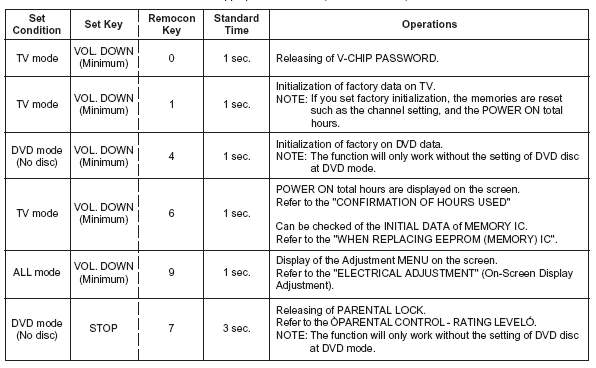
CONFIRMATION OF HOURS USED
POWER ON total hours can be checked on the screen. Total hours are displayed in 16 system of notation.
NOTE: If you set a factory initialization, the total hours is reset to "0".
Turn on the POWER, and set to the TV mode.
Set the VOLUME to minimum.
Press both VOL. DOWN button on the set and Channel button (6) on the remote control for more than 1 second. After the confirmation of using hours, turn off the power.


Akai CFTD2011 TV Service Menu

Akai | Author | February 17, 2015
Akai LCD CFTD2011 TV Service mode
Turn on the television and go to TV mode .
Press Volume up & Channel down simultaneously and hold the bot key for 3 seconds, TV screen will
display FACTORY MODE.
Use remote to select SysInfo icon . press Select key will display DVD & TV version.
To select parameter use channel button.
To Change the value press volume button.

Service Menu Akai LCD TV CFTD2011
Photo credit to www.inisdesign.com


Before you entering Akai CFTD2011 factory mode to change any value on the factory service mode, please write down all the original factory settings. tvservicemenu are not responsibility for any damage, data error and unwanted effect after using our service code and information on these page.
Original remote or universal remote control needed as a tools to program the factory mode (Recommended use the original remote control).
If the code above do not match to your television please browse another service code in sitemap page.


Akai CFT 2716 TV Service Menu

Akai | Author | February 16, 2015
Akai CFT2716 CFT2726 Service mode
Turn on the television, press menu and 5 times (Time range 6 seconds) Info button immediately after Menu button pressed on the remote control.
TO select parameter use channel up/down button or use 0-9 key to select desired mode and to enter Service "X" menu directly.
To change the value settings pres volume up/down button.

IF ADJUSTMENT
To enter Service "4" metod, enter service menu and enter the key number 4 on the remote control, after that the service "4" will bring up.
Set the IFFS to "1"


Akai CFT2716 CFT2726 Service mode B+ ADJUSTMENT
Operate the TV with AC 120V
6EWW:Horizontal width set the correct picture width

Akai CFT2716 CFT2726 Service mode WHITE BALANCE ADJUSTMENT
Acces the TV MENU and set the color to "Normal" mode
Receive a black-white pattern with color sync signal
Adjust the contrast and brightness in such a way that the brightnes value of the black area is 5 nit and the white is 80 nit
Enter Service "3" and adjust RED, GRN, WPR and WPB in such a way that X and Y have the following values:X=0.248 Y=0.299

Focus Adjustment Set contrast to maksimum and brightness to midle position.
Adjust Focus on the FBT to obtain the sharpest and clearest picture on the CRT.

Service Menu Akai TV CFT 2716
Photo credit to www.inisdesign.com


Akai CFT2716 CFT2726 Service mode OSD Adjustment
Receive the television signal with caption text
Enter service "2"
Select correct value for the item bellow
6VOF : Vertical OSD position aligment
6CCV : Vertical OSD of CCD position aligment
HOF : Horizontal OSD position aligment
CCHF : Horizontal OSD of CCD position aligment
VX : Vertical zoom (Select 25)


Akai 29CTF66BC TV Service Menu

Akai | Author | February 13, 2015
Enter the factory menu Akai 29CTF66BC
For remote controller of user:
Push [menu] key, -> display picture manual -> press key 6483 ->display M
Push [standby] key , exit factory mode and TV will be standby.
By remote controller for factory push [preset] +[test] key on remote controller, the TV mode
will change as follow:
Normal M Normal select “M” ( factory mode ) or “normal” mode.
Push standby key or test key . the TV will be exit factory mode.
Press key 1~4 will be enter MENU1 to MENU4
CHILD LOCK PASS WORD[4100]

Service Menu Akai 29CTF66BC TV
Photo credit to www.inisdesign.com

Factory menu
Receive standard Crosshatch pattern signal for PAL system .
a) Adjust VSLOPE value, to the horizontal line just appear from half bottom shadow.
b) Adjust VSHIFT value, the center horizontal line correspond to Horizontal line
CRT vertical center.
c) Adjust Vamp value to get 90% of vertical picture contents would be displayed on CRT.
d) Adjust HSHIFT value' to get the picture horizontal center correspond to CRT horizontal center.
e) Receive standard Crosshatch pattern signal for NTSC system, and again adjust.

Receive 60dBu (1mv)VH color bar signal' adjust AGC value (voltage from high to low) to
picture noise reduce gradually to be just disappeared.

Receive gray and white 2 steps signal.
a) CRT cut off adjustment.
1. push [P+][P-] key to select “SC”, push [V+][V-] key then automatically vertical scan will be
stopped.
2. adjust SCREEN control on Flyback transformer to get the darkest single horizontal line
(red,green).
3. push [V+][V-] key again, vertical scan work repeat.
b) white balance adjustment.
1. select RD/BD menu.
2. adjustment RD/BD to get color temperature as x=281, y=311.
c) sub-brightness adjustment (use stair case signal)
1. select SB MENU.
2. adjust SB to get the darkest step being out off.


Universal Remote

  • Chunghop RM-168GS code List
  • iWave Supersize Universal Remote
  • Automator URC 200 CD Players
  • Asaki Universal Remote for DVD
  • AMAZONE Universal Remote for DVD

CRT Television

  • Zenit TV Service Menu
  • Hisense HSM 515AV TV Service Menu
  • Grundig CUC 7301 TV Service menu
  • SIERA SG1420 TV Service Menu
  • RCA G27684 TV Service Menu


Plasma Television

  • Samsung HCH 551WX TV Service Menu
  • Beko L5C TFT LCD TV Service Menu
  • Beko LCD PLASMA L6E TV Service Menu
  • Beko Plasma TV Service Menu
  • Samsung Plasma TV Service Menu

LED Television

  • How to enter to Sansui TV Service Menu
  • LG 42LB62 LED TV Service Menu
  • Sanyo LED LCD TV Service Menu
  • How to enter to Telefunken TV Service Menu
  • Konka LED TV Service Menu

LCD Television

  • Hisense LCD 19V87 TV Service menu
  • Insignia NS LCD37HD-09 TV Service menu
  • Hisense K15 Series TV Service Menu
  • Hisense MT5380 TV Service menu
  • Grundig 42PX TV Service Menu


  • FORUM
  • Announce
  • Claim
  • Contributor
  • Universal Remote
  • Terms of Service
  • Privacy Policy
  • About
  • Contact
© 2008 - tvservicemenu. All Rights Reserved